
Avec l’apparition de log de sécurité dans Asterisk à partir de version 10.x, il devient facile de configurer le fail2ban pour Asterisk.
Au début il faut préparer le dépôt « EPEL » :
| # cd /usr/src/ # wget http://dl.fedoraproject.org/pub/epel/6/x86_64/epel-release-6-8.noarch.rpm # rpm -ivh epel-release-6-8.noarch.rpm# yum update |
On cherche le fail2ban dans les dépôts :
| # yum list | grep fail2ban |

On l’installe :
| # yum install fail2ban |
On fait les configurations nécessaires :
| # nano /etc/fail2ban/jail.conf |
1. Il faut ajouter dans ce fichier /etc/fail2ban/jail.conf les lignes suivantes :
| [asterisk-iptables] enabled = true filter = asterisk action = iptables-allports[name=ASTERISK, protocol=all] sendmail-whois[name=ASTERISK, dest=root, sender=fail2ban@votredomen.org] logpath = /var/log/asterisk/messages maxretry = 2 findtime = 60000 bantime = 259200 |
2. On configure le fichier /etc/fail2ban/filter.d/asterisk.conf
# nano /etc/fail2ban/filter.d/asterisk.conf
| # Fail2Ban configuration file # # # $Revision: 250 $ # [INCLUDES] # Read common prefixes. If any customizations available — read them from #_daemon = asterisk # Option: failregex failregex = SECURITY.* SecurityEvent= »FailedACL ».*RemoteAddress= ».+?/.+?/<HOST>/.+? ».* # Option: ignoreregex |
On n’oublie pas de noter votre IP ou des plages d’IPs à ignorer ignoreregex = votre_IP
3. On configure le fichier logger.conf
# nano /etc/asterisk/logger.conf
| [general] ; dateformat=%F %T ; ISO 8601 date format [logfiles] ;debug => debug security => security console => notice,warning,error messages => security,notice,warning,error |
4. On relit les logs :
| # asterisk -rx « logger reload » |
5. On restart le fail2ban
| # service fal2ban restart |
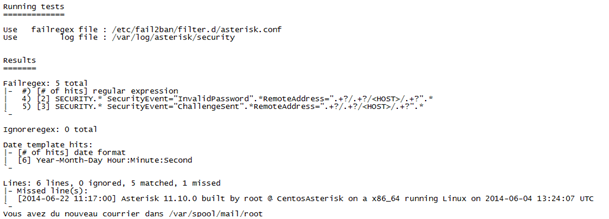
6. Vérification :
| # fail2ban-client status |

| # iptables –n -L |

| # fail2ban-regex /var/log/asterisk/messages /etc/fail2ban/filter.d/asterisk.conf |
Pour débloquer IP (unban):
# fail2ban-client set asterisk-iptables unbanip [ip-address]
 TSRIT
TSRIT 
Laisser un commentaire